Sand Loop Level 233 Solution Walkthrough | Sand Loop 233
How to solve Sand Loop level 233? Get instant solution for Sand Loop 233 with our step by step solution & video walkthrough.
Sand Loop Level 233 Guide: The Apple-Head Cat Puzzle
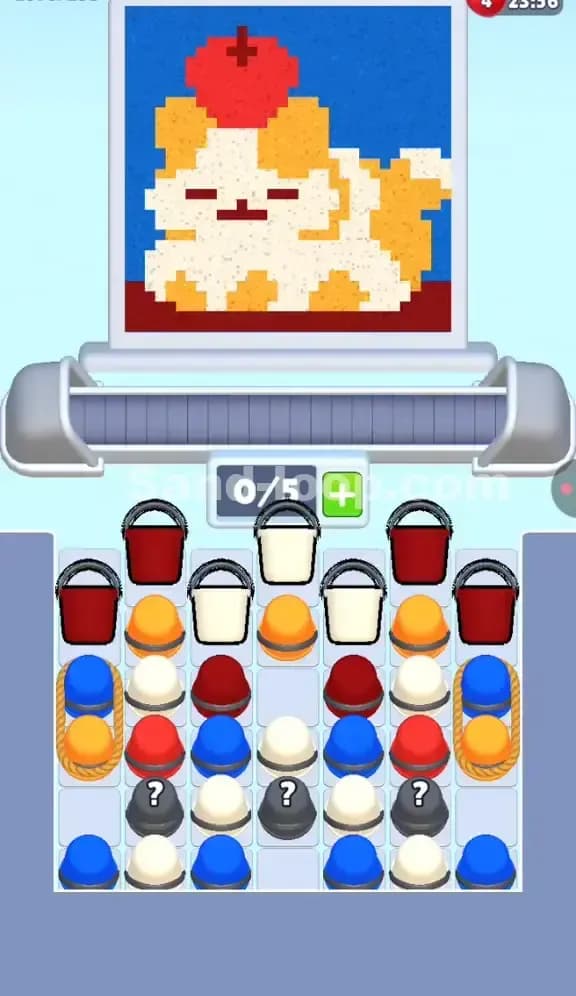
Identify the Art: This level features a pixel-art "Calico Cat" (or perhaps a dog, given the floppy ears) balancing a massive red apple on its head.
Identify the Level Type: This is a Supply Stack Logic level. The difficulty isn't speed; it's digging through layers of buckets in the correct order to reach the colors buried at the bottom.
The Hook: The color palette is deceptive. You see a lot of Orange and White, but the critical "Black" pixels for the eyes and the "Blue" pixels for the background are buried under heavy stacks or hidden inside Mystery Buckets (?).
Sand Loop Level 233 Solution: Analyzing the Calico Cat
The artwork here dictates your pacing. If you look at the top screen, you see distinct zones that correspond to the supply tray mess below:
- The Red Zone (Top): The giant apple. This is your "opener." The level gives you Red buckets immediately to clear this large, simple block.
- The Chaos Zone (Middle): The cat's face and body. This is a noise of White and Orange pixels. This is where players lose. The game forces you to alternate between white and orange rapidly, clogging your 5 conveyor slots if you aren't careful.
- The Hidden Details: Notice the dark eyes, nose, and the apple stem? There are no Black buckets in the main tray. These colors are hidden inside the gray Mystery Buckets (
?) at the bottom center. - The Blue Background: The entire sky is Blue. Looking at the tray, Blue buckets are largely at the bottom or locked on the sides. The game wants you to finish the main art before filling the background.
Tackling the "Roped Columns" in Sand Loop Level 233
The specific obstacle here is the set of Roped Columns on the far left and right edges of the tray.
Notice the ropes wrapping around a Blue bucket and an Orange bucket? In Sand Loop 233, these ropes act as a dependency lock. You cannot pull the lower items in that column until the rope is dealt with, but more importantly, these side stacks are often the only source of Blue early on.
However, these roped stacks are buried under the initial Red/Red-Orange layers. You literally cannot touch them at the start. They are a "Do Not Disturb" sign. Ignore the sides completely until you have cored out the middle of the tray. Trying to clear the sides early usually leaves you with Blue paint when the canvas still needs Orange, causing a stall.
Sand Loop Level 233 Step-by-Step Walkthrough
1. The Red Apple Rush
Your first moves are dictated by the top row of the supply tray. You have Red buckets sitting right on top.
- Action: Tap the available Red buckets immediately. Do not touch the White ones yet.
- Reasoning: The Apple is the topmost visual element and requires a solid block of red. By clearing the Reds first, you create "holes" in the supply wall, allowing access to the second layer of Orange and White.
- Slot Check: You have 5 slots (0/5). Load 3 Reds. Let them pour. Keep 2 slots open for emergency transitions.
2. The Orange/White Alternation
Once the initial Reds are gone, you hit the messy middle layer. The tray presents a mix of White and Orange buckets.
- The Trap: Do not just spam tap every bucket you see. The cat's fur is patchy. If you load 3 Orange buckets but the scanner is currently passing over a White section of the face, the conveyor stops, and you gridlock.
- The Fix: Watch the pixel scanner line on the canvas. If it's hitting a patch of white fur, tap only White buckets. Once it moves to an orange patch, switch. This sounds basic, but in Level 233, the supply is mixed, so you have to surgically pick the right color from the pile.
3. Cracking the Mystery Buckets (?)
As you clear the center, you will expose the gray Mystery Buckets with question marks.
- Identification: These contain the Black/Dark Gray sand needed for the cat's eyes, nose, and the apple stem.
- Timing: Do not uncork these until the scanner is approaching the face details. If you release the Black sand while the scanner is still on the apple or the background, it’s wasted time. Wait until the White/Orange fill is nearly done around the face area, then tap the
?buckets. They are usually programmed to provide the "rare" color exactly when needed, provided the path is clear.
4. The Blue Background Cleanup
By now, you should have reached the bottom of the tray and the side columns.
- The Shift: You will see a lot of Blue buckets finally becoming accessible from the bottom rows and the Roped stacks.
- Final Pour: The background is the largest area but the lowest priority logic-wise. Once the cat and apple are done, you can mindlessly tap every Blue bucket remaining to flood the sky. Because Blue is the last color needed, you can fill all 5 slots without fear of blocking other colors.